Local-business review AI

Every review, answered in one place.

Reply Rail pulls your Google, Yelp and Facebook reviews into a single queue, drafts a tone-matched reply for every one, and shows you what people love — so you stay under 24 hours without writing a word.

3 platforms, one rail 6 locations Replies in your voice
0
reviews queued and ready to answer
0
locations tracked in one rail
0
platforms: Google, Yelp & Facebook
One inbox, three platforms

Every review lands in the same rail — sorted by how fast it needs you.

An AI urgency model reads each new review as it arrives and drops it into a lane, so you always see the 2-hour fires before the thank-yous.

Urgent

Low-star or flagged reviews to answer within 2 hours to protect the rating.

7waiting

Reply soon

Mixed and mid-star reviews worth a personal touch inside the day.

6today

Auto-thanked

Glowing reviews that get a warm, on-brand thank-you the moment they land.

13handled

Quiet

Star-only ratings with no comment — noted, tallied, and left in peace.

no action
How a reply happens

Pull. Draft. Send. Three steps, one rail.

Reply Rail does the reading and the writing. You do the one thing only an owner can — decide it sounds right, and hit send.

Step one

Pull

New Google, Yelp and Facebook reviews stream into one queue. The AI urgency model reads each and files it in a lane.

  • Sorted into Urgent, Reply soon, Auto-thanked, Quiet
  • Themes tagged per review
Step two

Draft

A reply is written in your brand voice, grounded in the exact words of the review, and fitted to each platform's character limit.

  • Three tone presets: warm, professional, apologetic
  • Quotes the phrases the reviewer actually used
Step three

Send

Skim it, tweak a word if you like, and post — right back to the platform it came from. Under 24 hours, every time.

  • Posts back to Google, Yelp or Facebook
  • Response time held under 24h across locations
The signal in the noise

Know what people love — and what they don't.

Beyond individual replies, Reply Rail reads every review together: the topics people keep raising, how ratings move over 12 weeks, and how each location is really doing.

Themes from this month

PositiveMixedNegative
Staff friendliness142
Sentiment +0.78 · people keep naming your baristas
Pastries118
Sentiment +0.71
Wait time64
Sentiment −0.42 · the recurring complaint to watch
Ambiance & music89
Sentiment +0.51
Wi-Fi & power47
Sentiment +0.18 · mixed

Rating trend

Last 12 weeks

All three platforms, one chart.

Google 4.7Yelp 4.4Facebook 4.6

Per-location scorecard

6 locations
Aurora SoMa 4.4
Loves the space Wait time
Aurora Mission 4.8
Strong Wi-Fi Seating
Aurora Marina 4.6
Natural light Parking
Inside Reply Rail

The whole workflow, in three screens.

This is the actual product a multi-location coffee chain runs every morning.

01 — The inbox

Twenty-five reviews, four lanes, zero guesswork.

Every review across Google, Yelp and Facebook, sorted by urgency the moment it arrives. Filter by platform, location or sentiment — and see today's queue at a glance.
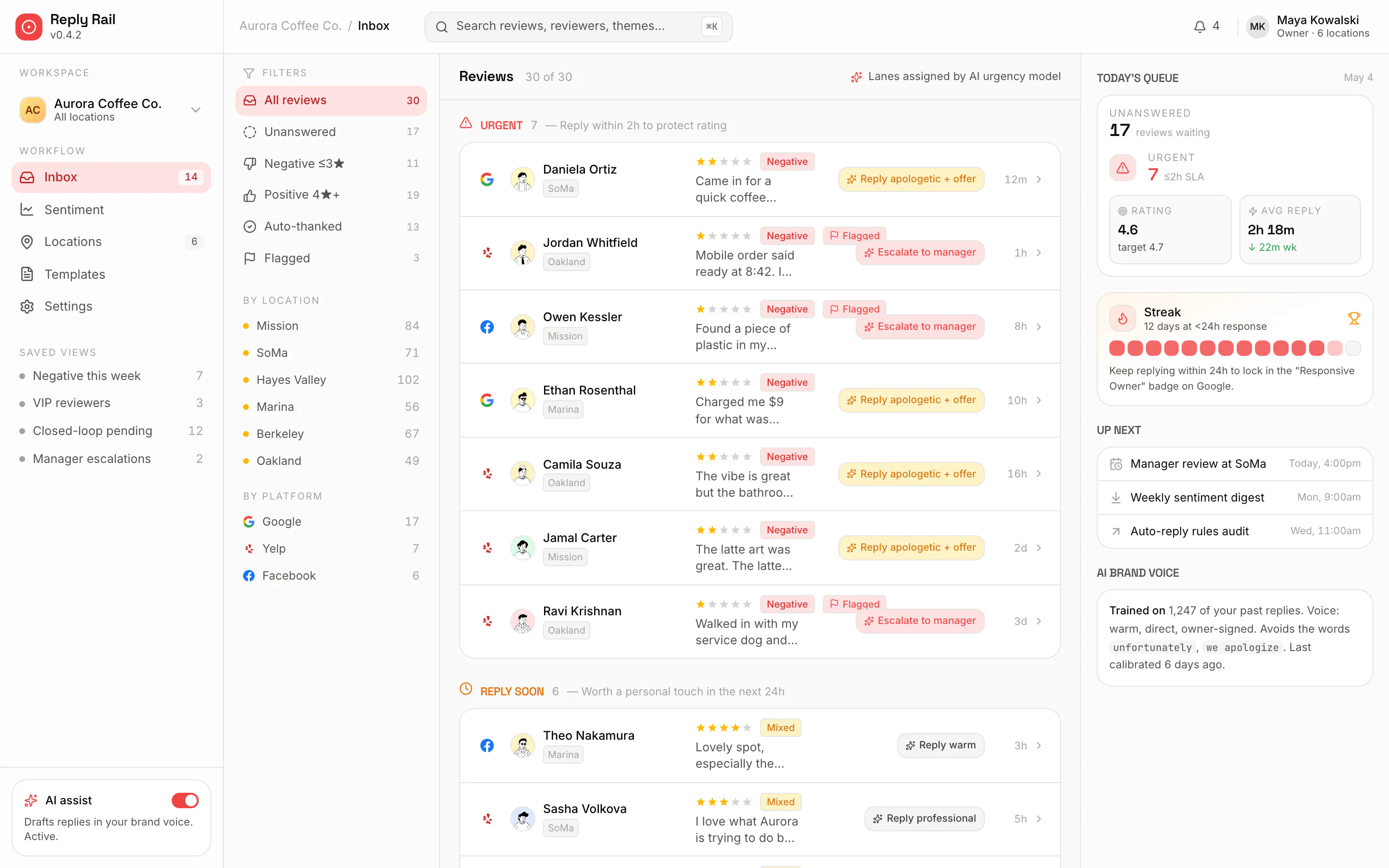
  • Urgent, Reply soon, Auto-thanked and Quiet lanes
  • A suggested action beside each review
  • Today's queue: unanswered count and average reply time
app.replyrail.com/inbox
Reply Rail unified inbox showing 25-plus reviews from Google, Yelp and Facebook sorted into Urgent and Reply-soon lanes, with a suggested reply action beside each and a today's-queue panel on the right.
The unified inbox — reviews across all three platforms, in AI urgency lanes.
02 — The dashboard

Themes and ratings you can act on Monday morning.

Per-platform ratings with month-over-month movement, and a panel of AI-extracted themes coloured by sentiment — so the wait-time complaint surfaces before it costs you a star.
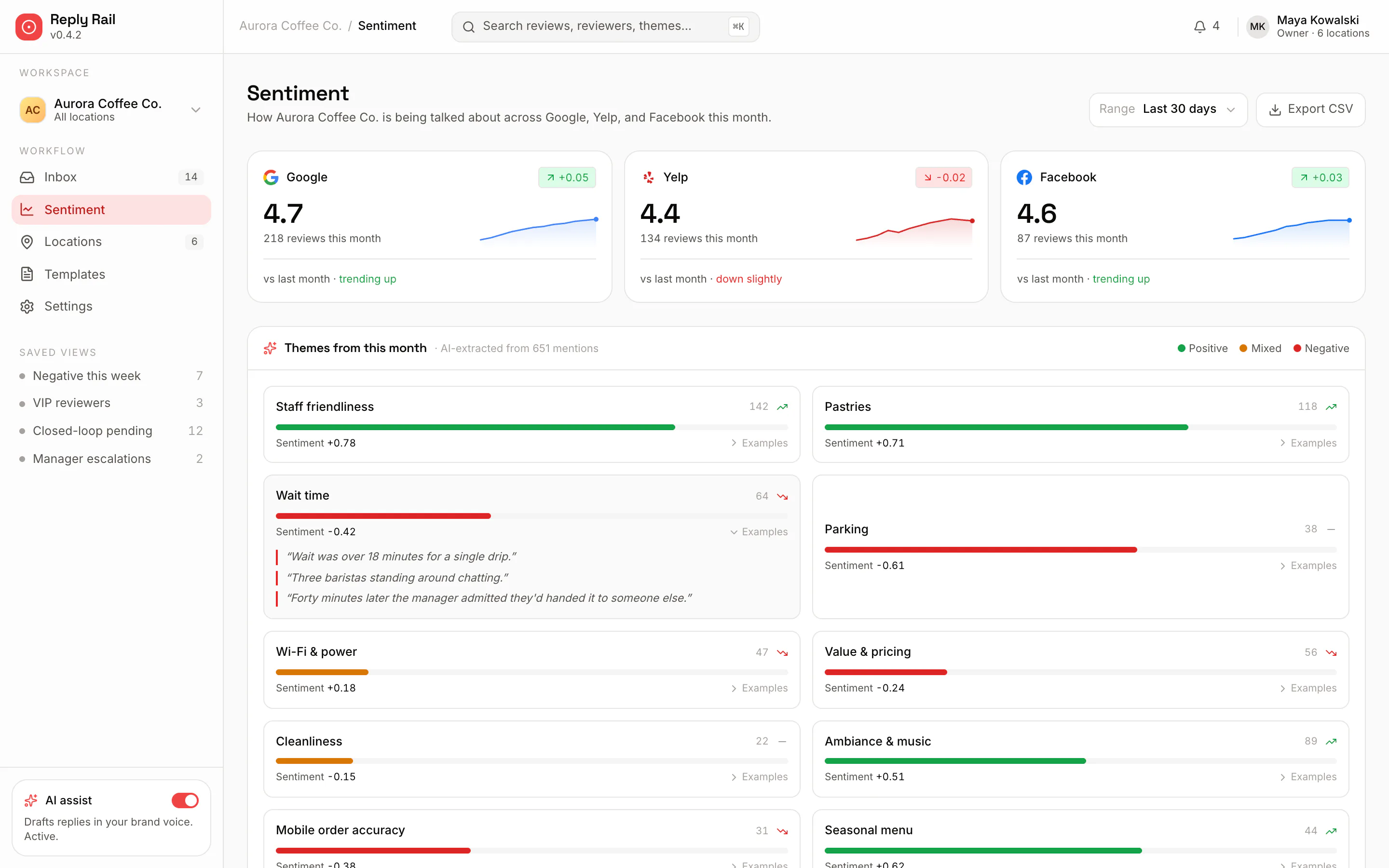
  • Google, Yelp and Facebook ratings side by side
  • Themes with sentiment-coloured bars and example quotes
  • Export the month to CSV in one click
app.replyrail.com/sentiment
Reply Rail sentiment dashboard with Google 4.7, Yelp 4.4 and Facebook 4.6 rating cards over sparklines, above a themes panel where AI-extracted topics like staff friendliness and wait time are drawn as green and red sentiment bars.
The sentiment dashboard — platform ratings and extracted themes.
03 — The reply

A drafted reply, grounded in what they actually wrote.

Open any review to see the drafted response beside three tone presets, the phrases it pulled from the review, and a live character count against the platform's limit.
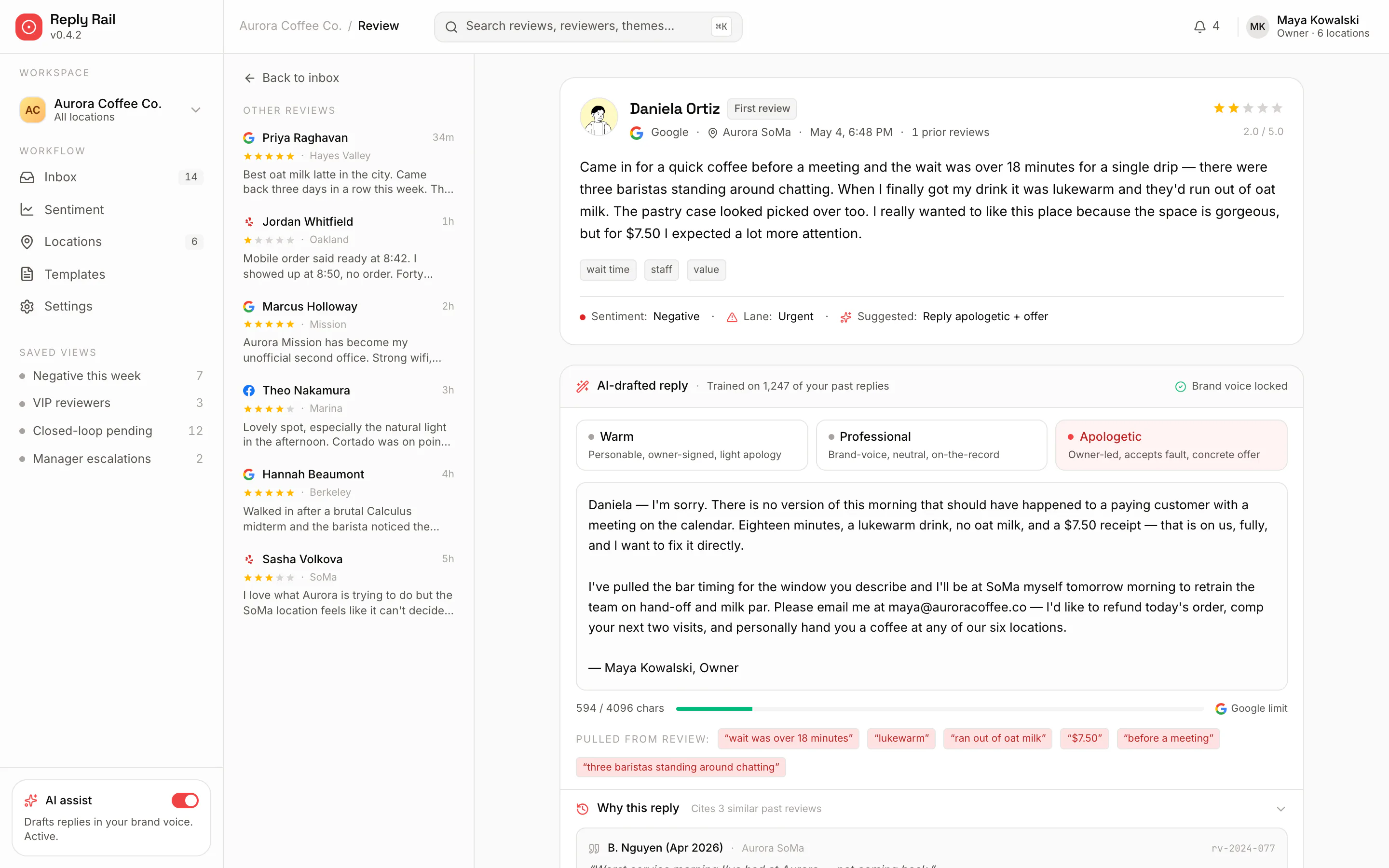
  • Warm, professional and apologetic in one tap
  • Highlights the exact quotes it responded to
  • Character limit shown per platform before you send
app.replyrail.com/review
Reply Rail review detail: a two-star Google review about an 18-minute wait, next to an AI-drafted apologetic owner-signed reply, three tone-preset tabs, a character count against the Google limit, and chips showing the phrases pulled from the review.
The review detail — a drafted reply with three tone presets.
Built to ship

A modern stack, engineered for local business.

Next.js Tailwind Framer Motion TypeScript

Spend minutes a day on reviews, not an hour.

See Reply Rail on your own Google, Yelp and Facebook reviews. We'll walk you through the inbox, the drafting, and the sentiment trends for your locations.

Built for multi-location local businesses. Now running for an F&B chain under NDA.